Wetland Ranger: a field outfit for Bedrock

9 views 0 downloads

A moss-green field outfit with turquoise cuffs and a tan pack, plus the original Classic PNG and editable source.

Wetland Ranger gives a river explorer a moss-green jacket, field cap and small tan pack. Turquoise cuffs and a pale shirt break up the green, while dark trousers and boots keep the outfit grounded. It fits a riverside base, a mapping trip or a character who looks after paths between small settlements.
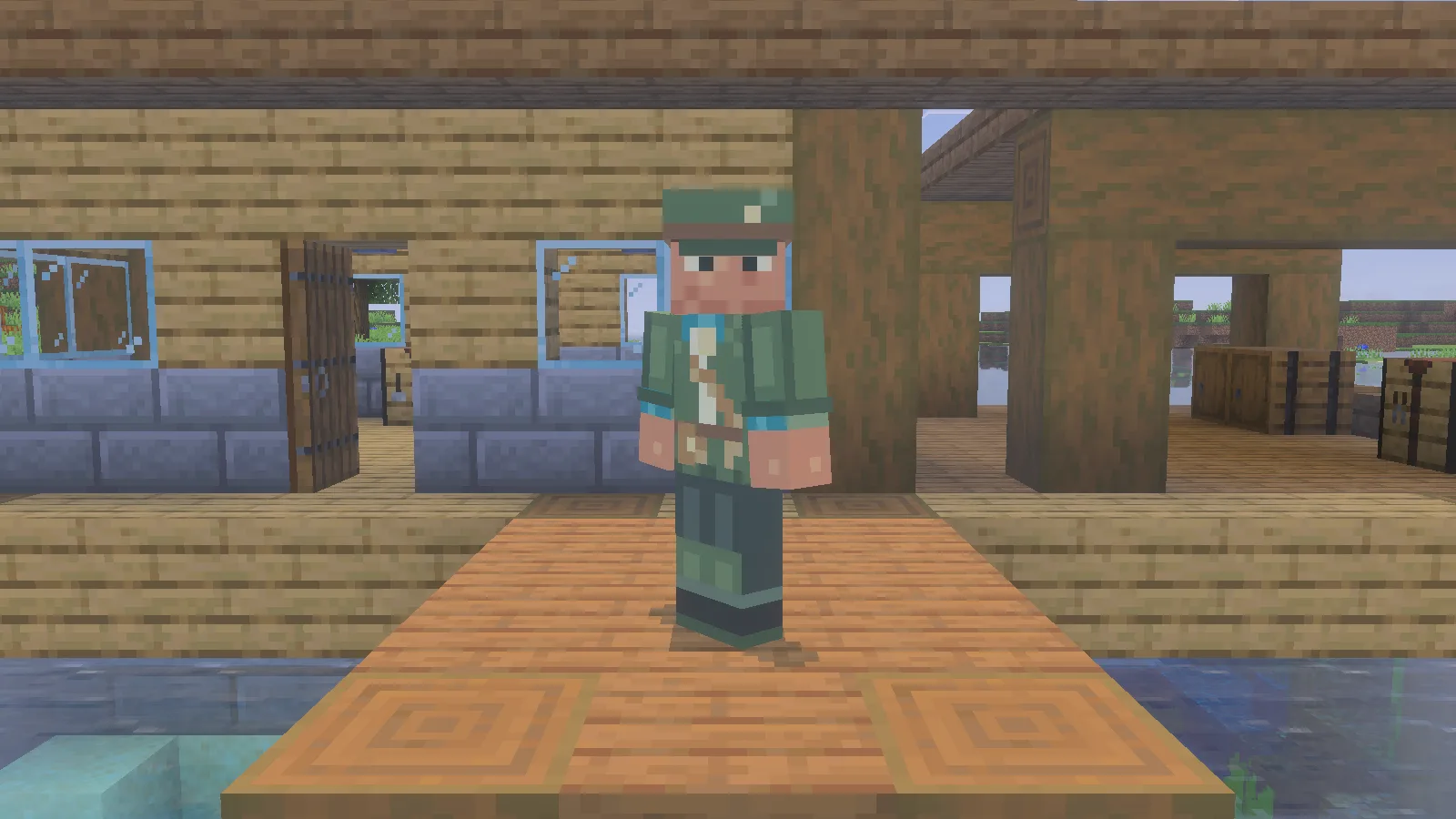
Wetland Ranger skin viewed from the front on a wooden landing in Minecraft Bedrock.

The Ranger’s field cap, tan strap and turquoise cuffs against a timber landing.

Give the outfit a home

A boat landing, sheltered map table and supply chest make a useful corner for this character. A timber wall or pale sandbank gives the green clothes a clearer outline than dense leaves. Keep the scene simple enough that the cap, cuffs and diagonal strap remain easy to see.

From behind, the tan pack becomes the main detail. It is painted artwork, so bring your normal inventory supplies; the skin does not add storage. Switch to third-person view when you want a portrait and leave enough room in the frame for both the cap and boots.
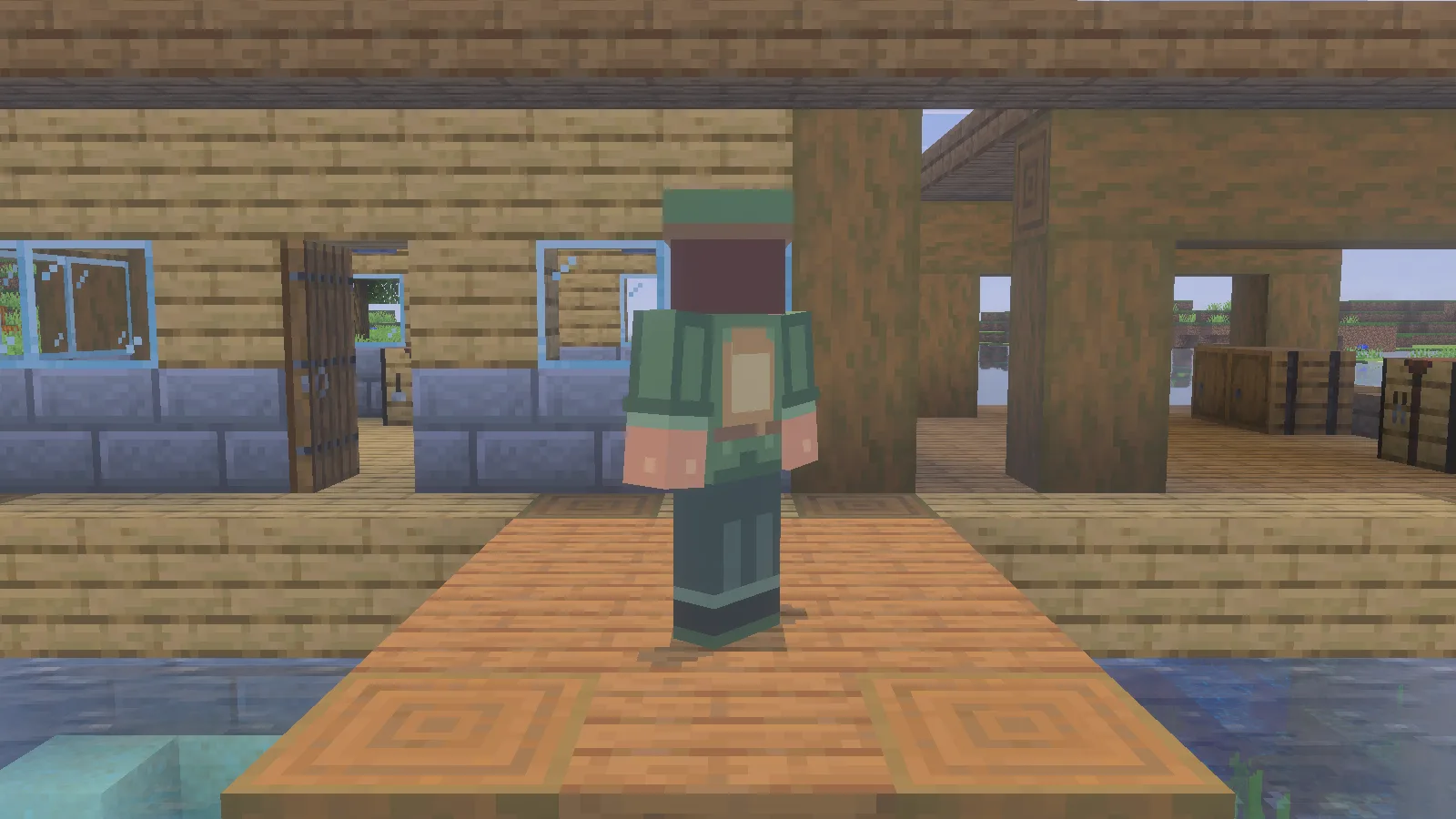
Back view of the Wetland Ranger skin showing the tan pack and green jacket.

The tan pack and jacket details from behind. The pack is part of the skin artwork.

Import the original PNG

This is a 64 × 64 Classic skin with four-pixel-wide arms. The following route uses Windows Bedrock’s Dressing Room.

  1. Save modonix-wetland-ranger.png from Files. Use the original skin PNG, not a picture of the character.
  2. In Windows Bedrock, open Dressing Room → Classic Skins.
  3. Under Owned Skins, select the blank character tile and choose Choose New Skin. Select the saved PNG.
  4. When the two model previews appear, choose the right-hand, wide-arm model. This artwork uses Classic arms, four pixels wide; Slim uses three.
  5. Return to your character and check the cap, sleeves and back before taking an outfit picture.
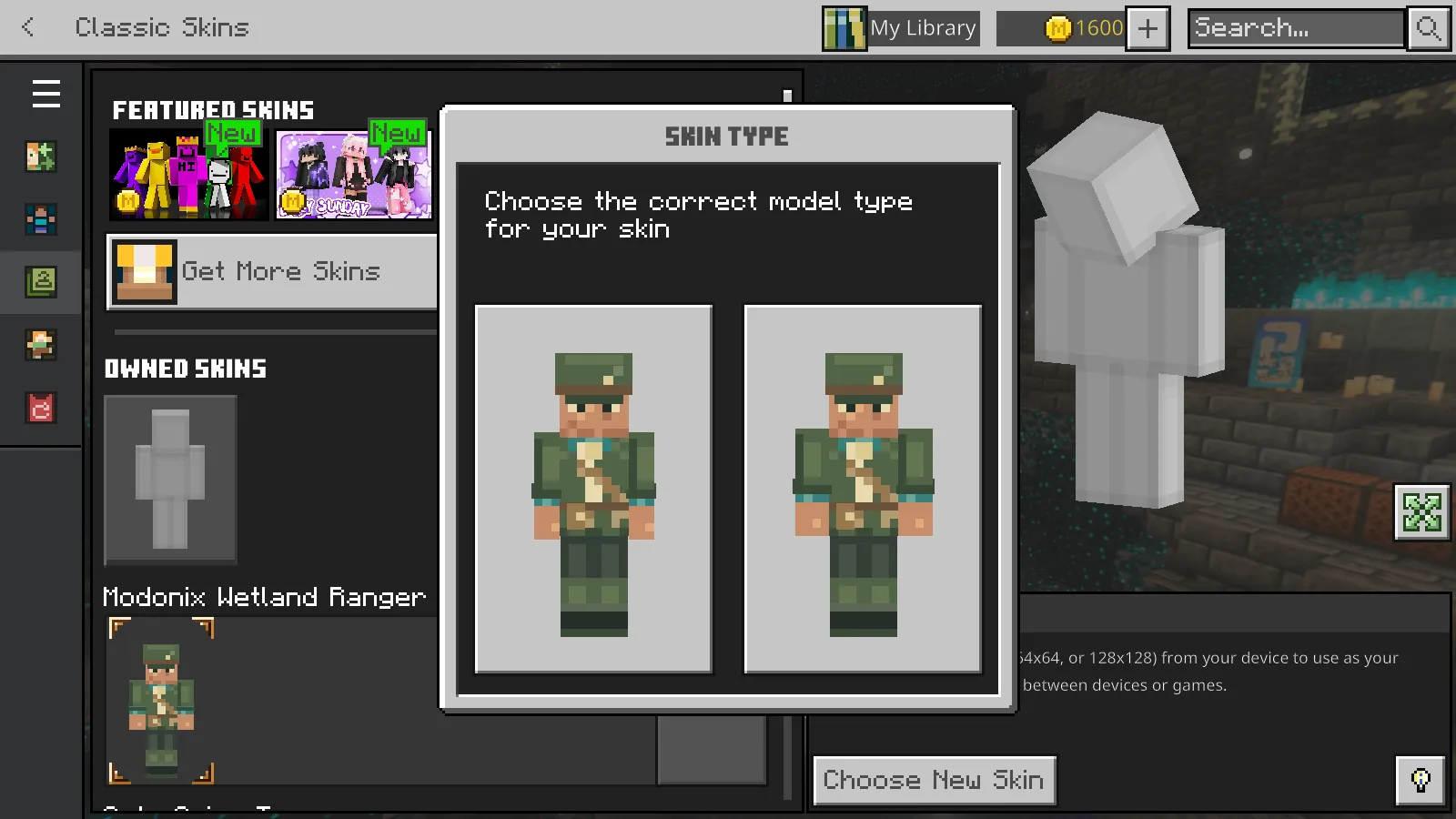
Minecraft Bedrock Skin Type dialog showing the Ranger on Slim and Classic wide-arm models.

Choose the wide-arm model on the right for this Classic skin.

The separate one-skin MCPACK packages the same Ranger artwork. Open that file with Minecraft, then find Modonix Wetland Ranger among your Classic Skins. The PNG is the simplest choice when you only want to equip this one outfit; the Source ZIP is for editing, not importing into Dressing Room.

If the pack does not appear straight away, close and reopen Minecraft, then return to Owned Skins.

Make a small color edit

Start with the turquoise cuffs before repainting the whole jacket. Preserve the shading and check both arms and the back after exporting.

The Source ZIP offers two ways to edit the drawing. For visual editing, open a working copy of source/skin.ora in an OpenRaster-capable editor. Its base, details and outer layers are also included as separate PNGs. Keep the canvas at 64 × 64, use a one-pixel pencil with smoothing off, and preserve transparent areas around the outer layer. Export a flattened PNG from the editor and keep the layered copy for later changes.

For the code-based version, edit source/design.json, then run python source/build-skins.py from the extracted package folder. The exporter writes PNGs to build/. It reads the pixel-operation design; it does not read changes made only in the ORA drawing. Choose one workflow for an edit so the two sources do not drift apart.

Artwork © 2026 Modonix. All rights reserved. The exporter code has a separate MIT license; that license does not grant permission to redistribute the skin artwork.

No ratings yet

Files

Filter files 3 filesAll release types
Show all files

Version 0.1.0

Stable

modonix-wetland-ranger.png

Classic
0 downloads
Download · 1.1 KB
Requirements & details

Classic skin PNG · 64×64

  • Model: Classic · Image size: 64x64 · Listed devices: Windows

Save the original PNG. In Dressing Room, open Classic Skins, select the blank Owned Skins tile, and choose New Skin. Select the wide-arm model on the right.

Technical details
File details
Download type
Main
Included skins
1
Skin names & models
Wetland Ranger — Classic / Wide, 64×64
File information
Image dimensions
64×64

Manifest values describe the package. They do not prove that it works with every game version. This check is not an antivirus scan.

SHA-256: 7ce8ce6186526efa5653e6c5a65b028a55346e53e14f941027b4261a8bb8a4e5

modonix-wetland-ranger-0.1.0.mcpack

Classic
0 downloads
Download · 2.1 KB
Requirements & details

One-skin MCPACK

  • Model: Classic · Image size: 64x64 · Listed devices: Windows

Open this MCPACK with Minecraft, then find the skin pack in Dressing Room → Classic Skins and equip its skin.

Technical details
File details
Download type
Main
Included skins
1
Skin names & models
Wetland Ranger — Classic / Wide, 64×64
File information

Archive structure and entry integrity checked · 5 entries · 0.0 MB unpacked.

Pack name
pack.name
Pack version
0.1.0

Manifest values describe the package. They do not prove that it works with every game version. This check is not an antivirus scan.

SHA-256: 446afae401389199933ffb50d76c2243e324fdaadb5a1fac2830af3cc0385e93

modonix-wetland-ranger-0.1.0-source-r2.zip

Classic
0 downloads
Download · 14.9 KB
Requirements & details

Editable Source ZIP · revision2

  • Model: Classic · Image size: 64x64 · Listed devices: Windows

Extract this ZIP and read README. Edit the ORA in an image editor, or edit design.json and run the included Python exporter; do not import the ZIP into Minecraft.

Technical details
File details
Download type
Source
Skin names & models
Wetland Ranger — Classic / Wide, 64×64
File information

Archive structure and entry integrity checked · 11 entries · 0.1 MB unpacked.

No supported compatibility manifest was read. Review the author’s file requirements.

Manifest values describe the package. They do not prove that it works with every game version. This check is not an antivirus scan.

SHA-256: c3dc01c4b4597a1a43680114e3a3338824b2a949b5ead0171ab02bf882e6aba0

Release updates

Version 0.1.0

Stable

Wetland Ranger 0.1.0 includes the Classic skin PNG, a one-skin MCPACK and editable source with a Python exporter.

View files

Comments & questions

Share what worked, ask for help or reply to another player.

No comments yet. Share what worked for you.

Join the conversation

No account required. Confirm your email with a code before your first comment.

1Your name & email

Only a masked address appears with your name. Guest comments are reviewed before publication.

2Verify & post

Search Modonix

Search in